Create business email addresses on your own domain (e.g. info@yourcompany.com). Your mail is stored in Turkey, with anti-spam protection, Outlook and phone support, and 24/7 technical support.

Per-account pricing: buy as many business email addresses as you need and add accounts as your team grows.
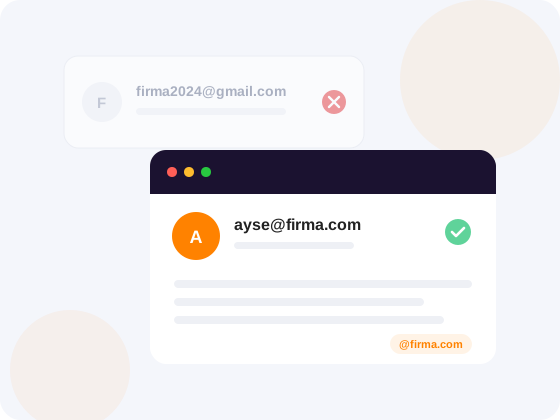
Corporate email is a professional email address on your own domain, such as jane@yourcompany.com. Also called business email, it carries your brand instead of a free Gmail or Hotmail address, and your company keeps full control of every account.
Customers can see from the address that the message really comes from you. SPF, DKIM and DMARC records keep your mail out of spam folders, and when an employee leaves, the account and its conversations stay with your company.
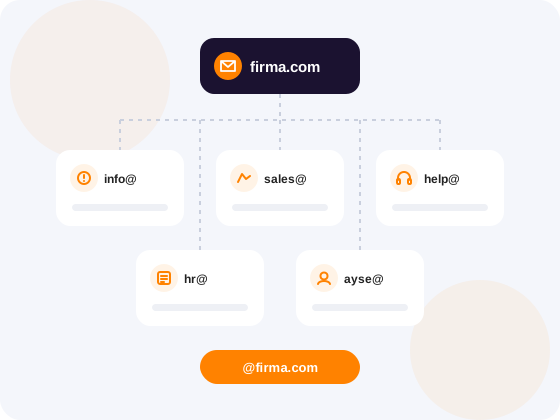
When choosing business email addresses, keep them short, easy to read and clear about their purpose:
info@firmaniz.com — general enquiriessatis@firmaniz.com — quotes and ordersdestek@firmaniz.com — customer supportmuhasebe@firmaniz.com — invoices and paymentsad.soyad@firmaniz.com — personal address for each employeeAvoid special characters and use the same pattern for every employee. For department addresses, use aliases and forwarding instead of opening separate accounts.
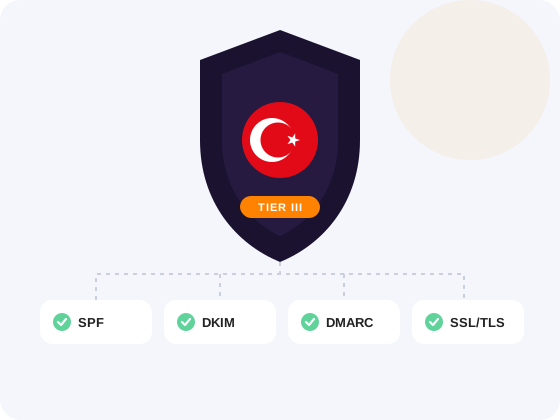
All mail on BurtiNET's corporate email platform is stored in Tier-3 certified data centers in Turkey. Keeping data inside the country makes it easier to meet your KVKK (Turkish data protection) obligations.
Every plan includes SSL/TLS encryption, antivirus and anti-spam protection. SPF, DKIM and DMARC records help your mail reach recipients safely, and accounts are protected against brute-force attacks automatically.
Guide (in Turkish): What is SPF and how does it work?If your domain is ready, your corporate email accounts work within minutes. We also move your existing mail for free.
Corporate email needs a domain name. Register one with BurtiNET or use a domain you already have elsewhere; you do not need a website.
Search for a domainChoose Mail One, Business, Corporate or Enterprise based on the storage you need, and add one account per employee.
Set up accounts such as info@, sales@ or first.last@, plus aliases and forwarding, in the control panel.
The MX record routes your mail to the right server, while SPF, DKIM and DMARC keep the messages you send out of spam folders. BurtiNET configures these records for your domain.
Add the account to Outlook, iPhone Mail or Android with IMAP or Exchange ActiveSync, or sign in to webmail from any browser.
# Webmail login
https://mail.meposta.com

# Outlook · iPhone · Android
Account typeIMAP / Exchange ActiveSync
Username    jane@yourcompany.com
Password    the one you set in the panel
Server in your welcome emailA complete business email platform with webmail, calendars and team tools
SOGo provides a modern, feature-rich webmail interface accessible from any browser — desktop or mobile. Compose emails with a rich HTML editor, apply advanced content filters, and manage multiple signatures. With shared calendars, contact lists, and task management, your business communication stays perfectly organized. SOGo webmail is a full-featured replacement for traditional desktop email clients like Outlook.
Create professional addresses such as info@domain.com, sales@domain.com or name@domain.com in seconds, and add accounts as your team grows. Every account has its own inbox, storage quota, auto-responder and signature. POP3, IMAP and SMTP support means it works with Outlook, Thunderbird, Apple Mail and mobile devices.
Create email groups and distribution lists for departments, teams or projects. Shared calendars and contacts, powered by SOGo's groupware features, make coordination across teams easier.
Make sure your email reaches the inbox with full DNS authentication. SPF verifies authorised senders, DKIM signs messages cryptographically and DMARC defines your authentication policy. MX, PTR (reverse DNS) and A/CNAME records are configured to maximise deliverability and keep your mail out of spam folders.
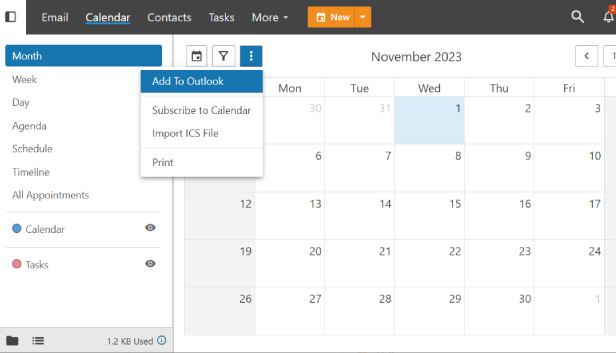
Manage your business appointments with SOGo's powerful calendar system. Schedule meetings with attendee availability checking, book conference rooms, and handle multi-timezone events effortlessly. Shared calendars let teams coordinate schedules in real-time. CalDAV support ensures seamless synchronization with mobile devices, Apple Calendar, Google Calendar, and other third-party calendar applications.
Keep your business contacts organized with SOGo's advanced address book. Store detailed contact information including business and personal details, multiple phone numbers, email addresses, and custom categories. The Global Address List (GAL) provides company-wide contact access, making it easy for all team members to find colleagues and business contacts. Full CardDAV support ensures contacts sync across all your devices and applications.
Enterprise-grade features for reliable and secure business communication
Multi-layer spam filtering combines Bayesian filtering, DNS blocklists, content analysis and custom rules to stop most unwanted mail before it reaches your inbox. Protection rises from Basic to Premium depending on the plan.
Deleted an important email by mistake? On Business plans and above you can restore deleted messages within the retention period and recover important business conversations.
On Corporate and Enterprise plans the quota grows automatically when a mailbox is nearly full, so mail keeps flowing. On other plans you can move up a plan whenever you need more space.
All email traffic is encrypted with SSL/TLS. SMTP, IMAP and POP3 connections are encrypted, keeping sensitive business conversations safe in transit.
Exchange ActiveSync (EAS) gives instant email, calendar and contact sync on iOS and Android without extra apps; CalDAV and CardDAV are supported too.
Your corporate email is hosted on fault-tolerant, clustered infrastructure with BurtiNET's high availability platform. Redundant servers, power systems, and network connections ensure your email service stays online 24/7/365.
See storage, security and collaboration features side by side.
Compare our packages and choose the one that suits your needs
Do you just need reliable business email, or a full office suite? The right choice depends on what your team needs.
| Feature | BurtiNET Corporate Email | Google Workspace | Microsoft 365 |
|---|---|---|---|
| What you get | Business email, calendar and contacts | Email, Drive, Docs and Meet | Email, OneDrive, Teams and Office |
| Data location | Turkey, Tier-3 data center | Google's global data centers | Microsoft's global data centers |
| Pricing | Per account, from $0.25 a month | Monthly subscription per user | Monthly subscription per user |
| Outlook and phones | IMAP, POP3 and ActiveSync | Gmail app and IMAP | Outlook and Exchange |
| Migration | Our team moves it for free | Done by your admin with migration tools | Done by your admin with migration tools |
| Support | 24/7 technical support | Google support channels | Microsoft support channels |
| Best for | Cost-focused businesses that only need email | Teams working in the Google ecosystem | Teams using Office and Teams |
Comprehensive hosting and infrastructure solutions for every business need
Everything about corporate email pricing, setup, login address and migration.
Corporate email is a professional email service that uses your own domain name (e.g. info@yourcompany.com) instead of generic providers like Gmail or Hotmail. It builds brand credibility, enhances customer trust, and provides enterprise-grade security features. Corporate email also offers better deliverability rates since emails from custom domains are less likely to be flagged as spam by recipient servers.
BurtiNET corporate email is priced per account and starts at $0.25 a month with 3-year billing. The price depends on the plan storage (10–100 GB) and billing period; you can pay monthly, yearly or for 3 years. Anti-spam, antivirus, SSL/TLS and free migration are included in every plan.
First you need a domain. Then you pick a plan and the number of accounts, complete the order, create your addresses in the panel and the DNS records are set up for your domain. See our step-by-step setup guide for details.
No. A domain is all you need; you can use addresses like info@yourcompany.com without a website. If your website is hosted elsewhere, you only point the email records to BurtiNET.
Business email runs on your domain, so you need one first. Find an available name on our domain search page and order it together with your corporate email plan.
Yes. Pricing is per account; start with a single account and add more as your team grows. You can also use aliases and forwarding for department addresses without opening extra accounts.
Sign in to your BurtiNET corporate email from any browser at the mail.meposta.com webmail. Your username is your full email address and your password is the one you set in the panel.
In Outlook, go to File > Add Account, enter your email address and choose IMAP or Exchange ActiveSync as the account type. The server addresses are in your welcome email; use your full email address as the username. Our 24/7 support team can walk you through it.
Yes. With Exchange ActiveSync (EAS) support you get instant email, calendar and contact sync on iOS and Android without extra apps. Apple devices can use CalDAV and CardDAV for calendars and contacts, and any other app can connect over IMAP or POP3.
Our expert team handles your entire email migration process with a zero-downtime guarantee. We transfer all your emails, folders, contacts, and calendar entries from your current provider (cPanel, Plesk, Microsoft 365, Google Workspace, etc.) to BurtiNET. During migration, DNS and MX records are carefully configured so you don't miss a single email. Important note: Due to security protocols, email account passwords must be reset during migration. Our support team will guide you through setting new passwords for all accounts after the transfer is complete.
SPF (Sender Policy Framework) verifies which mail servers are authorized to send emails on behalf of your domain. DKIM (DomainKeys Identified Mail) adds a cryptographic signature to your emails, proving they haven't been tampered with. DMARC combines SPF and DKIM policies to provide comprehensive email authentication. All three are essential for preventing email spoofing, ensuring deliverability, and keeping your emails out of spam folders. BurtiNET automatically configures all three for your domain.
BurtiNET's corporate email uses a multi-layered spam filtering engine that blocks up to 99% of spam. It combines Bayesian filtering (machine learning-based), DNS blacklist checking, content analysis, sender reputation scoring, and customizable rules. You can also create whitelists and blacklists per account or domain-wide. All spam filtering happens server-side before emails reach your inbox, ensuring a clean and productive email experience.
You see a warning in the control panel as your mailbox nears its limit. On Corporate and Enterprise plans the quota grows automatically; on Mail One and Business you can move up a plan at any time or archive older mail. You can monitor usage in the panel whenever you like.
Webmail (SOGo) is accessed through your web browser without installing any software — perfect for accessing email from any device, anywhere. Desktop email clients like Outlook or Thunderbird are installed on your computer and can work offline. The best approach is to use both: webmail for quick access and mobile use, and a desktop client for heavy daily use. BurtiNET corporate email supports both methods simultaneously via IMAP, ensuring your emails stay synchronized across all devices.
The account belongs to your company. When an employee leaves you can change the password to close access, forward incoming mail to a colleague and keep the old conversations, so customer communication is never interrupted.
Each account can send 100 emails per hour. The limit stops mass spam if an account is ever compromised and protects your domain reputation. For bulk campaigns we recommend an email marketing service.
Yes. Corporate email orders can be refunded within 3 days. If you are not happy with the service, just open a support ticket within that period.